Phishing Exposed: How to Spot and Stop Attacks Before They Strike
July 13, 2026 • Joseph Kyule
Introduction
Phishing remains one of the most dangerous cyber threats worldwide, with attackers sending an estimated 3.4 billion phishing emails daily. In Kenya, phishing consistently ranks among the top six cyber threats, according to the Communications Authority’s National KE CIRT CC quarterly cybersecurity reports.
What is Phishing?
Phishing is a social engineering attack where cybercriminals trick unsuspecting users into revealing sensitive information, clicking malicious links, or downloading malware. Attackers exploit human psychology, creating urgency, fear, trust, or greed, because they know that even the best technical defenses can be bypassed when people make mistakes. Phishing emails remain the number one entry point for most cyber breaches. Understanding what they look like is one of the most effective ways to protect yourself and your organization.
Anatomy of a Phishing Email
1. The sender’s Address
Always check both the display name and the actual email address. A message may appear from “Southendtech IT Support,” but the real address could be something random like no-reply@jgmh[.]co[.]id.

<Spoofed email display name>
2. Artificial Urgency.
Attackers use language that creates panic and forces quick action, such as “Your account will be suspended in 24 hours” or “Your password expires today.”
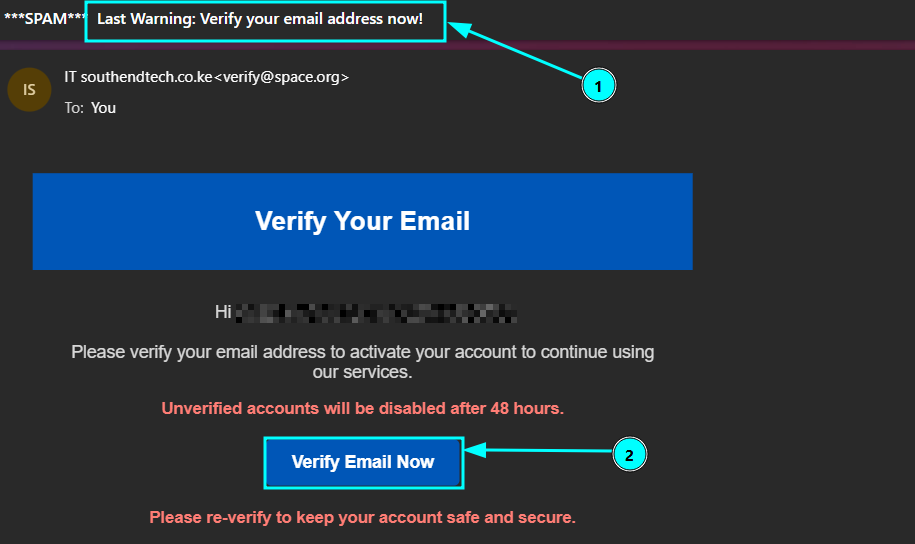
<False sense of urgency in email verification>
3. Embedded suspicious links.
Links in buttons or text often lead to fake login pages designed to steal credentials or deliver malware. Always hover over links to preview the real destination URL before clicking.
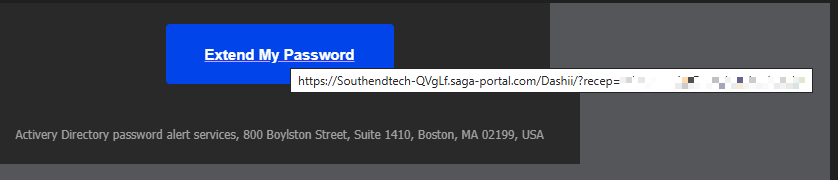
<Suspicious link not tied to company’s website>
4. Generic Greetings
Phishing emails frequently use vague greetings like “Dear Customer,” “Dear User,” or “Hello” instead of your actual name.
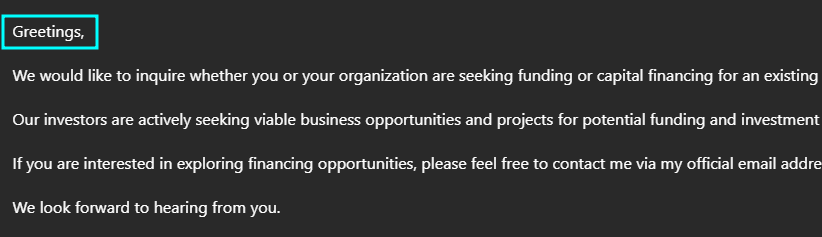
<Generic email greetings with no specified name>
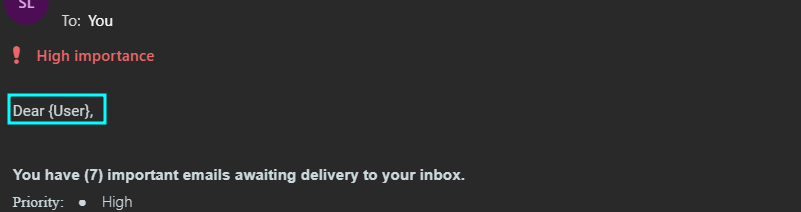
<Failed personalization strings in mass mailings>
5. Unexpected attachments
Be extremely cautious with unsolicited attachments, especially files with extensions such as .exe, .scr, .zip, .rar, or unexpected .pdf invoices and documents.
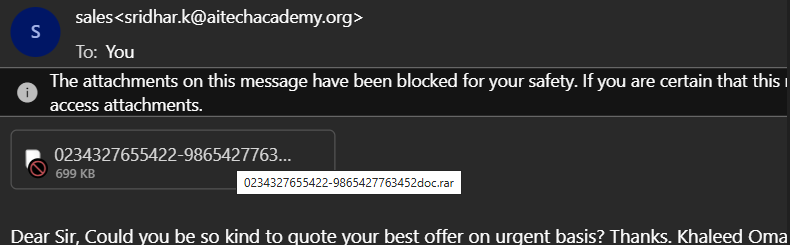
<Suspicious email file ending with .rar file extension>
6. Grammar and Formatting.
Spelling mistakes, awkward sentence structure, inconsistent branding, or low-quality outdated company logos are common red flags.
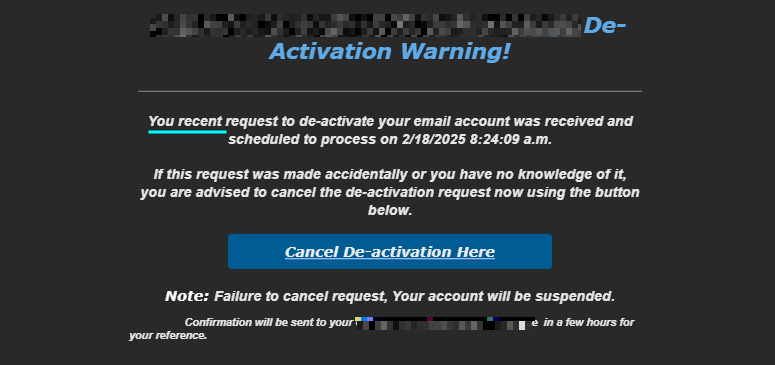
<A grammatical error: You instead of Your>
Common Phishing Real-World Scenarios
1. The Bank Alert
An email claiming to be from Equity, KCB, M Pesa, or another bank warns of suspicious activity on your account and urges you to “verify” by clicking a link. The message often threatens account suspension if you do not act immediately.
2. The You Have Won
You receive exciting news that you have won a large sum of money, airtime, a smartphone, or a car in a promotion or lottery you never entered. All you need to do is provide personal details or pay a small “processing fee.”
3. The HR/IT Notice
A message that appears to come from your company’s HR or IT department requests you to update your details, reset your password, or download a document related to payroll, taxes, or system maintenance.
Actionable Defense Blueprint (How to protect yourself)
1. Stop and Think
Before clicking any link or opening an attachment, pause and ask:
- Did I initiate this request?
- Did I actually enter this competition?
- Is this the normal way this organization contacts me?
2. Verify Externally
Never use the links or contact details in the email. Instead, visit the official website directly or call the organization using a known, trusted phone number to confirm the request.
3. Enable MFA
Even if attackers steal your password, Multi Factor Authentication (MFA) adds a critical second layer of protection (such as a one time code sent to your phone). Enable it on every important account.
4. Report it
At work, forward the suspicious email to your internal IT/security team for proof checking and analysis to determine the legitimacy.
If the email has hit your personal, consider reporting to the spoofed organization and forward to your email provider’s spam/abuse address. This helps the organization truck down the spammers and create more awareness to other users.
In Kenya, you can also report serious incidents to the National KE-CIRT/CC. The team is responsible
Conclusion & Call to Action
Phishing succeeds because it targets people, not just systems. By staying alert and following simple verification habits, you can dramatically reduce your risk of becoming a victim.
Take five minutes today to:
- Enable MFA on your most important accounts.
- Review recent emails for the red flags above.
- Share this guide with at least one colleague, friend, or family member.
Stay safe, stay vigilant. Awareness is your strongest defense.
Ready to assess your organization's security posture? Let us talk.
Telephone: +254 115 867 309 | +254 740 196 519
Email: cybersecurity@southendtech.co.ke | info@southendtech.co.ke | dataprotection@southendtech.co.ke
South-End Tech Limited — Helping East African businesses build secure AI-ready foundations.